
|
|
|
|
Exporting Reports to an SQL Database
DupScout Server and DupScout Enterprise provide the ability to export duplicate files search results to an SQL database via the ODBC database interface. In order to be able to export duplicate files search results to an SQL database, the user need to configure the ODBC database interface on the main options dialog. 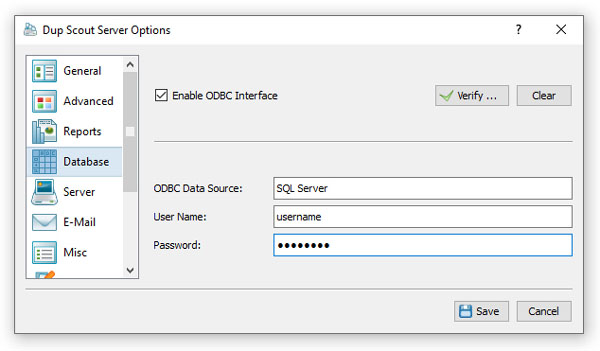 In order to configure the ODBC interface, open the main options dialog, select the 'Database' tab, enable the ODBC database interface, enter the ODBC data source name, the ODBC user name and password to use to connect to the SQL database and then press the 'Verify' button to check the specified ODBC interface. 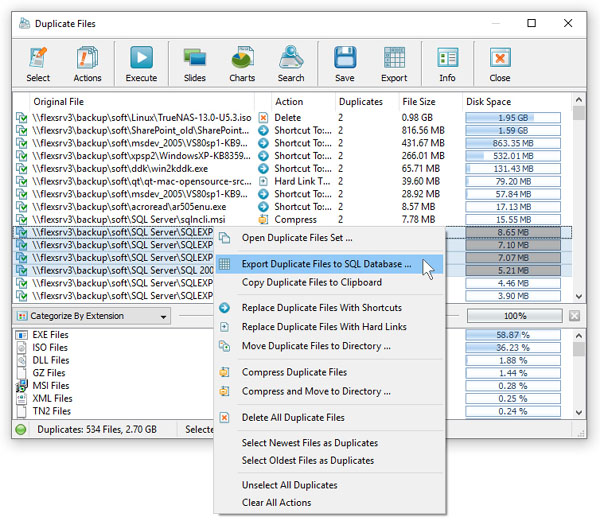 Once finished configuring the ODBC database interface, select one or more duplicate files sets, press the right mouse button, select the 'Export To SQL Database' menu item and enter the name of the SQL database table to export duplicate files search results to. DiskSorter will connect to the specified SQL database and export the selected duplicate files search results to the specified SQL database table.  In order to import duplicate files search results from an SQL database to Microsoft Excel, select the menu 'Data - Import External Data - New Database Query' menu item, select the ODBC data source to import the data from, select the SQL database table name that was specified during the export operation, select SQL database table columns to be imported, optionally select the data sorting mode and press the 'Finish' button.  For each duplicate file, DupScout exports to the SQL database the following columns of data: a unique duplicate file ID, a duplicate file set ID, the file creation date, the last modification date, the last access date, the file size, the file user name (should be enabled on the options dialog) and the full file name. Binary identical files will have the same duplicate files set ID.
|
DupScout News
|


