
|
|
|
|
DupScout GUI Screenshots
DupScout Server GUI Application The DupScout Server GUI application provides the ability to search duplicate files, categorize and filter detected duplicate files, save reports to the HTML, PDF, Excel, text, CSV and XML formats, export duplicate files to an SQL database, replace duplicate files with links, move duplicate files to another directory, delete duplicate files, etc.  Search Duplicate Files Dialog The search duplicate files dialog allows one to specify disks, directories and/or network shares that should be processed. In addition, the user is provided with the ability to detect servers and NAS storage devices on the network and search duplicate files in network shares in one or more servers or NAS storage devices. 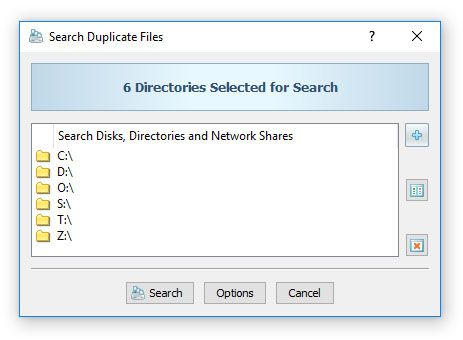 Remove Duplicate Files DupScout provides the ability to replace duplicate files with links, move duplicate files to another directory, compress duplicate files, delete duplicate files, etc. Before executing duplicate files removal actions, DupScout shows the duplicate files removal actions preview dialog allowing one to select/unselect specific duplicate files.  Duplicate Files Statistics and Pie Charts The pie charts dialog is capable of showing the amount of duplicate disk space and the number of duplicate files per file type, extension, user name, last access, modification and creation dates, etc. In addition, the user is provided with the ability to copy the chart image to the clipboard allowing one to easily integrate DupScout charts into user-custom presentations and documents. 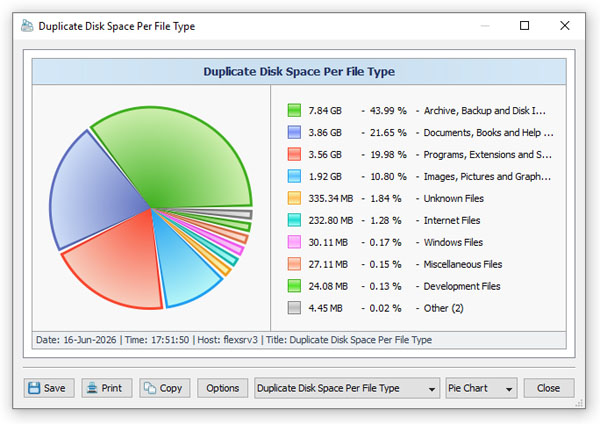 Searching Duplicate Files in Network Servers and NAS Storage Devices DupScout allows one to scan the network, discover network servers and NAS storage devices, automatically detect all accessible network shares and search duplicate files in hundreds of network servers and NAS storage devices.  Duplicate Files Search Options The duplicate files search options dialog allows one to specify the default report title, the type of file signature algorithm to use, the maximum number of duplicate file sets to display and provides an option to enable processing and display of duplicate files user names.  Advanced Duplicate Files Search Options The advanced duplicate files search options dialog provides the ability to control the duplicate files report host name, the maximum number of directory scanning threads, the number of duplicate files search threads and the duplicate file search operation performance mode.  Duplicate Files Search Rules The duplicate files search rules dialog allows one to limit the duplicate files search operation to specific types or groups of files according to one or more file matching rules. For example, the user is provided with the ability to search duplicate images with the file size more than 10 MB that were modified during the last month.  Duplicate Files Search Exclude Directories The duplicate files search exclude directories dialog allows one to exclude one or more subdirectories from the duplicate files search process. In addition, the user is provided with exclude directories macro commands allowing one to exclude multiple directories matching user-specified text patterns.  Duplicate Files Removal Actions The duplicate files search actions dialog allows one to define one or more automatic, rule-based policies specifying what duplicate removal actions to perform when specific types of duplicate files are detected. The user is provided with the ability to preview selected duplicate files removal actions or automatically execute the specified duplicate files removal actions on duplicate files matching the user-specified rules.  Duplicate Files Search Command Line Utility DupScout Pro and DupScout Server provide a command line utility, which can be used to search duplicate files, save HTML, PDF, Excel, Text, CSV and XML reports, export duplicate files to an SQL database, remove duplicate files, etc. In addition, the command line utility may be used to control one or more DupScout Servers locally or via the network.  DupScout Server DupScout Server is a server-based duplicate files search and removal solution, which runs in the background as a service and provides the ability to search and remove duplicate files, save various types of reports, perform history trend analysis operations and schedule periodic, fully-automatic duplicate files search and removal operations.  Duplicate Files Per Server DupScout Server and DupScout Enterprise are capable of analyzing duplicate files reports submitted from multiple servers and desktop computers and displaying various types of charts showing the amount of duplicate disk space and the number of duplicate files per host.  Duplicate Files Per User DupScout Server and DupScout Enterprise provide the ability to analyze duplicate files owned by multiple users and detected on one or more servers or desktop computers and display charts showing the amount of duplicate disk space and the number of duplicate files per user.  DupScout Enterprise Web-Based Interface In addition to the client GUI application, DupScout Enterprise provides a web-based management interface allowing one to control one or more servers using a regular web browser locally or via the network. 
|
DupScout News
|


